Part of the Ambysto Pro Suite, the jet-pack for every vibeworker · Mac & Windows
Ambysto Optimer
Your machine is slow. Now you know why.
Ambysto Optimer shows which app is eating your memory, CPU and disk.
Then it cleans only what grows back. It never force-quits anything.
Free on Mac and Windows
macOS 14+, Apple Silicon and Intel · Windows · Free forever
Slow Mac. No answers.
AI agents, dev servers and builds eat RAM and disk fast. Your current tools don't help.
-
Activity Monitor
Data, no direction.
Hundreds of processes. Names you don't recognise. No idea what to do next.
-
Cleaner apps
Delete first. Ask never.
Placebo "Free RAM" buttons. Scary scans. Your files are the risk.
-
Ambysto Optimer
Measure. Then clean what's safe.
See the app behind the number. Clear caches that rebuild. Approve everything else yourself.
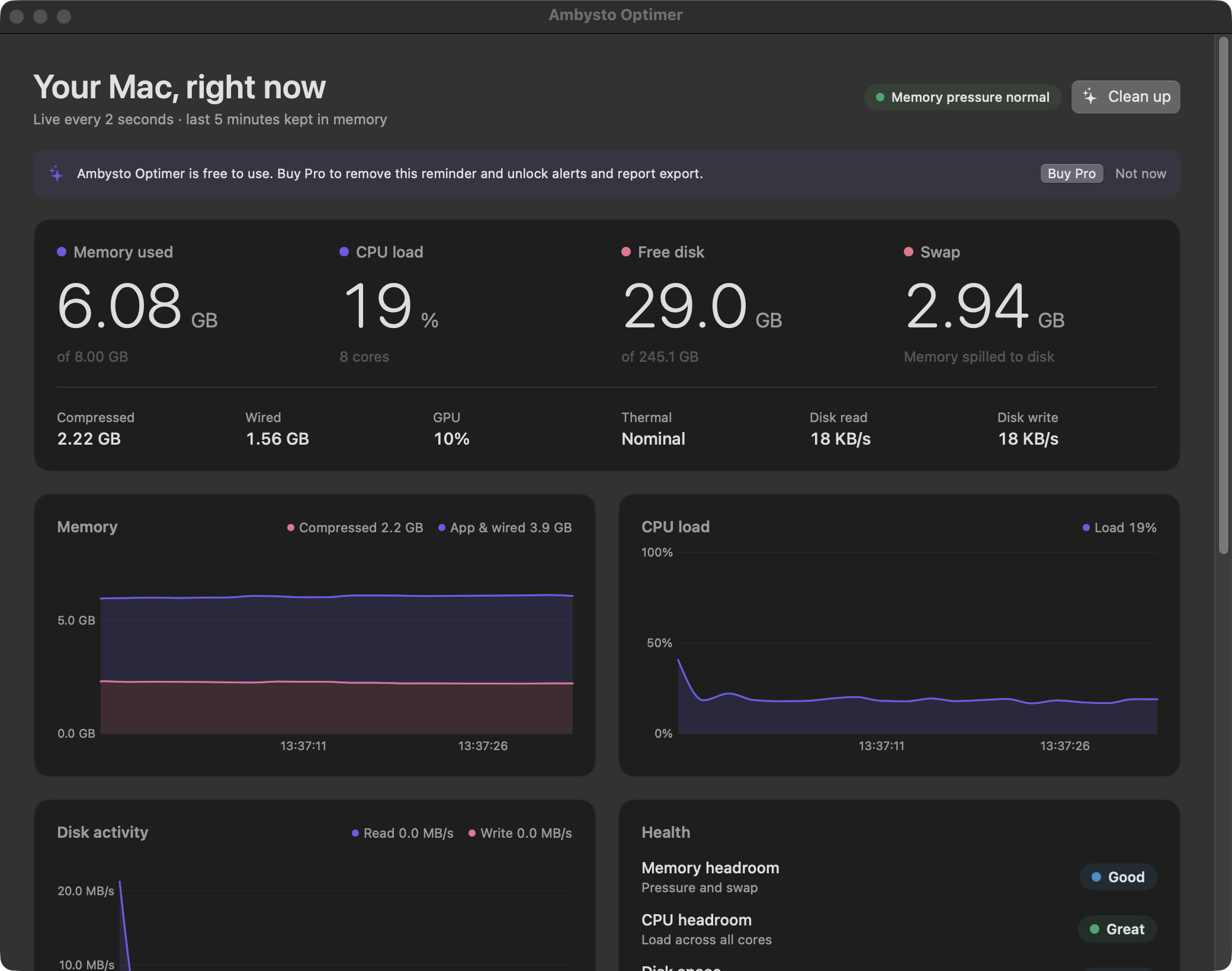
One row per app.
Chrome's 20 helpers count as Chrome. Memory, CPU and disk, rolled up. One click from your menu bar.
- Same numbers as macOS. Memory is physical footprint, the measure the system itself uses.
- Pressure at a glance. Green, yellow, red. Plus swap, thermal state and GPU.
- Runaway flag. One process over 8 GB? You see it, and the parent that started it.
- Quit, politely. Same as ⌘Q. Always asks first. No force kill. Ever.
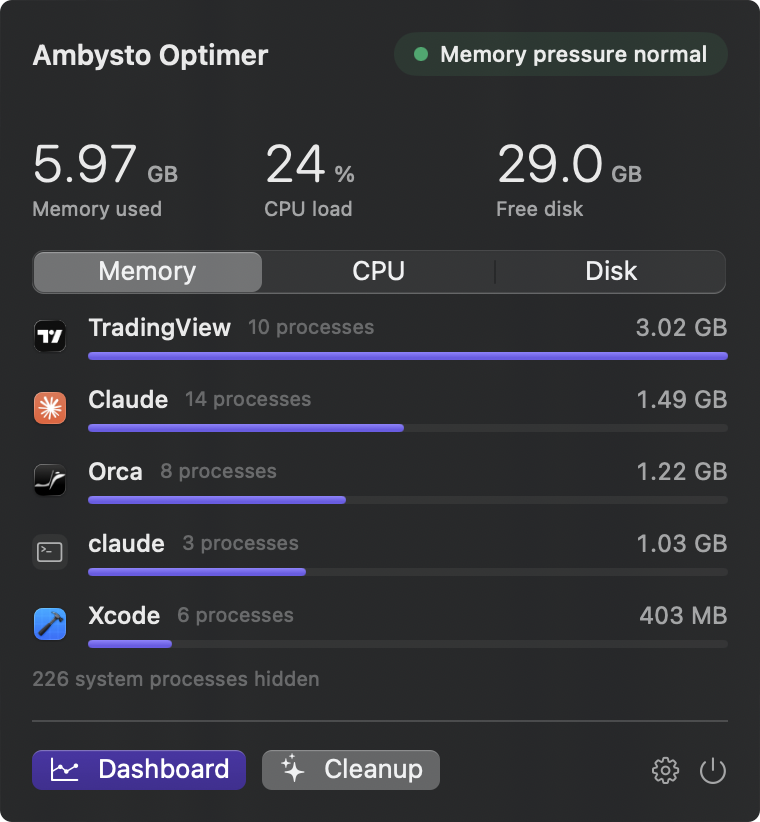
Big numbers. Live every 2 seconds.
Memory, CPU, disk and swap up front. Five minutes of charts behind them.
- Memory used 6.08GBof 8.00 GB
- CPU load 19%8 cores
- Free disk 29.0GBof 245.1 GB
- Swap 2.94GBMemory spilled to disk
- Memory headroom · Good
- CPU headroom · Great
- Disk space · Great
- Thermal · Great
Four ratings: Great, Good, Fair, Poor. Each one has a clear rule.
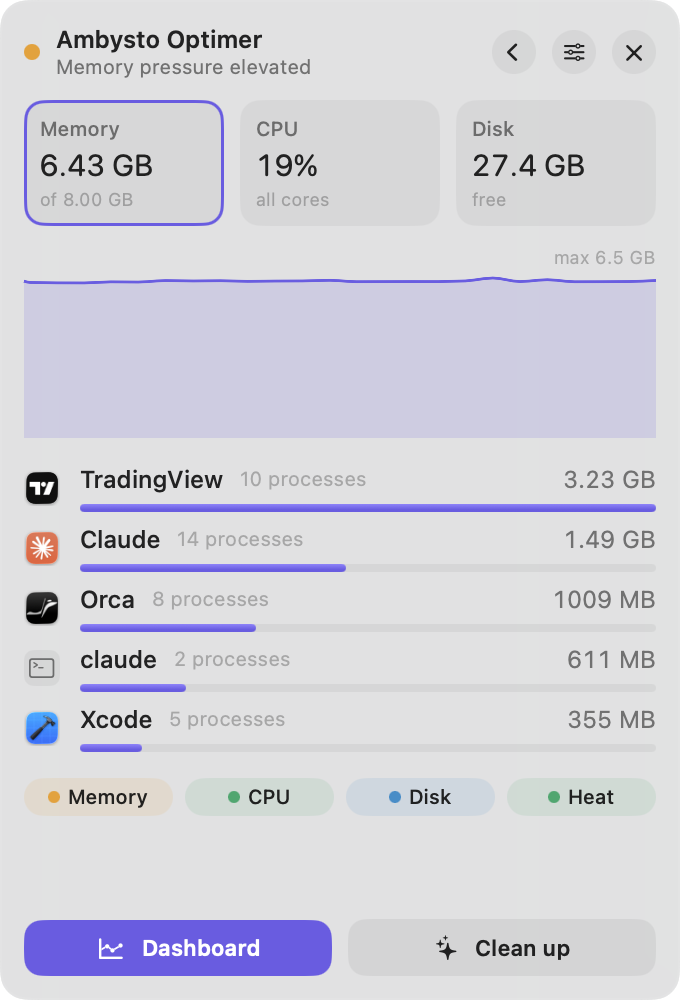
Always on screen.
A slim bar floats over every Space and full-screen app. It never steals focus. Expand it when something looks off.
- Mini bar. Pressure, memory, CPU, free disk.
- Table. Top five apps, a five-minute chart, Quit on hover.
- One shortcut. ⌃⌥M shows or hides it. It remembers its spot.
- Dock badges PRO Memory or CPU on the icon of every heavy app. Turns to a warning colour at 4x your limit.

Badges are click-through and hide when the Dock hides. Accessibility access is asked only when you turn them on. It reads icon positions, nothing else.
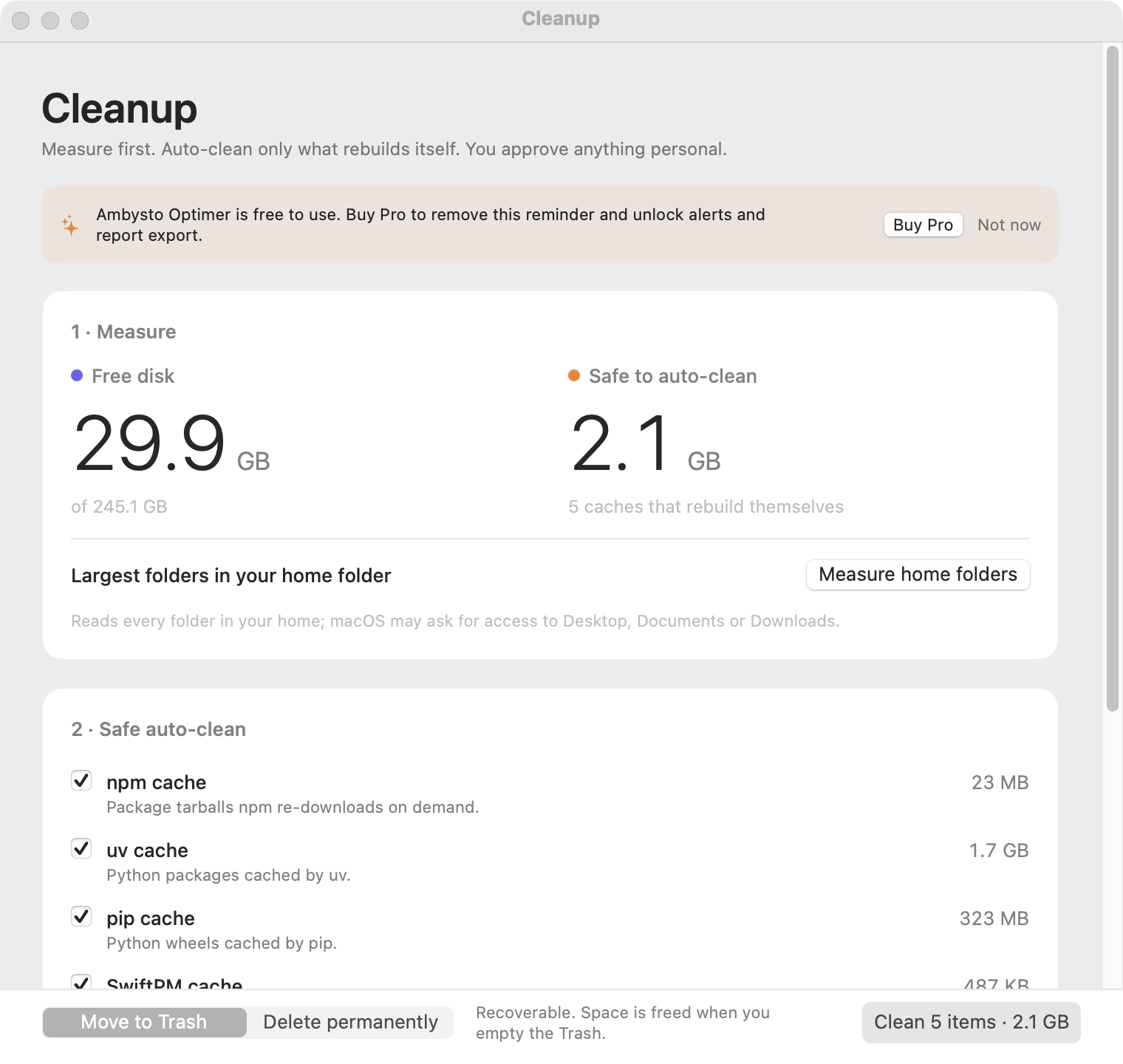
Measure first. Clean what regrows. Ask before the rest.
Same six steps, every time.
Measure
Free space, cache sizes, biggest folders.
Auto-clean
Caches that rebuild. Pre-ticked.
Approve
Personal items start unticked. You choose.
Pick a mode
Trash by default. Permanent only for caches.
Run
One item at a time. Cancel any time.
Report
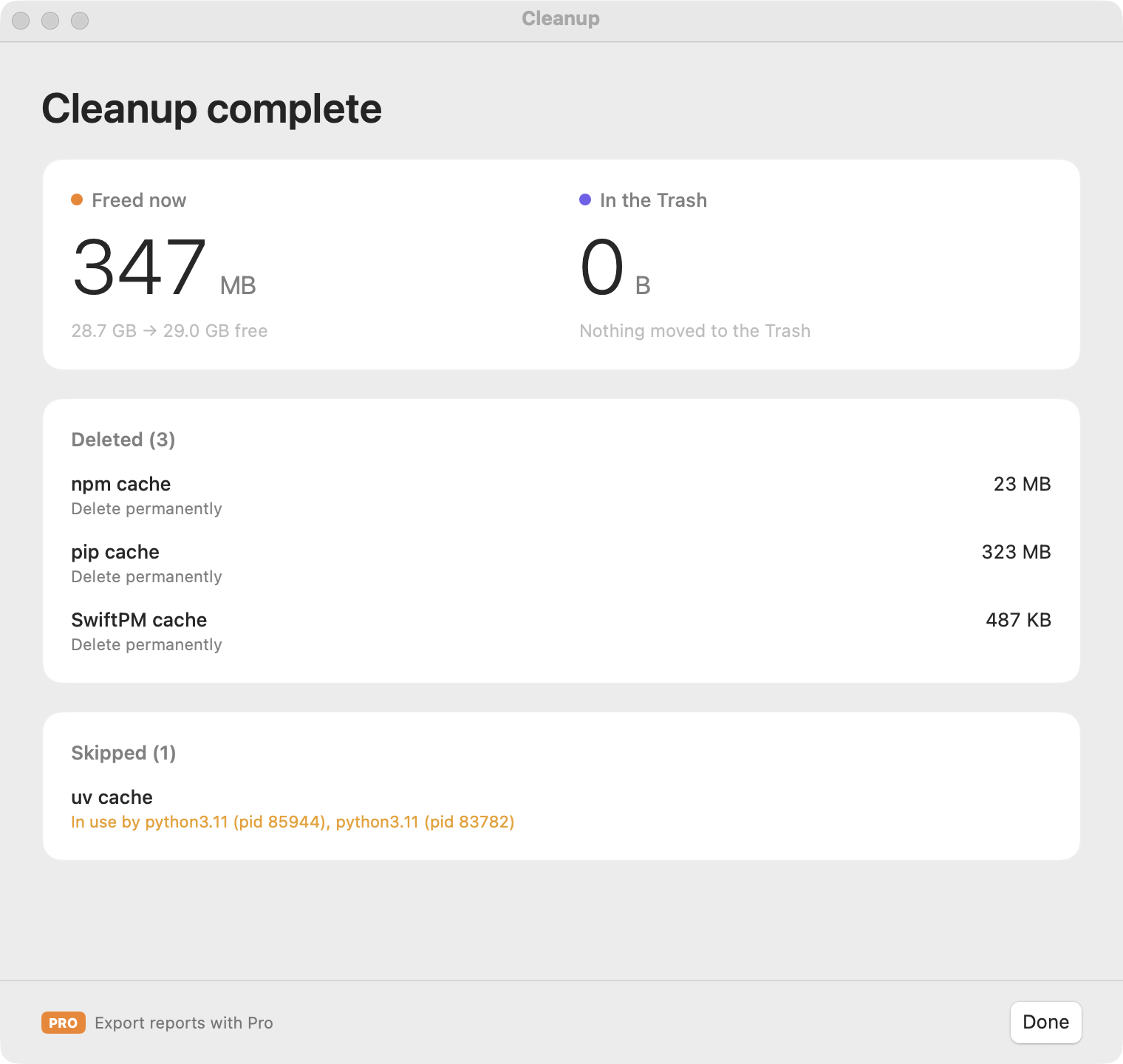
Space before and after. What went, what didn't.
Auto-clean
npm, bun, Yarn, uv, pip, Xcode DerivedData, SwiftPM, unavailable simulators.
Ask first
node_modules, Docker or Colima data, duplicate installers. Duplicates are checked byte for byte.In-use check
Something is using it? Skipped, and you see which process. Sizes are re-measured right before delete.
Safe by default.
Every delete passes a gate first. Touch anything on this list and it's refused.
Never touched
- Photos and photo libraries
- SSH and GPG keys, keychains
- Browser profiles: Safari, Chrome, Arc, Firefox, Brave, Edge
- Backups and Time Machine
- Agent transcripts in
~/.claude/projects
Never does
- Force-quit a process
- Run as admin or use
sudo - Follow a symlink to delete its target
- Sell you a "Free RAM" button
- Send anything off your Mac. No account. No upload.
Free works. Forever.
Pro adds extras. Free stays free.
Free
$0 foreverEverything you need to find the problem and fix it.
- Menu bar, popover, dashboard
- Floating mini bar and table
- Health ratings and polite Quit
- Measure, auto-clean, approval table
- On-screen report
Pro PRO
Soon price not set yetEverything in Free, plus:
- No reminder, ever
- Background alerts: critical pressure, low disk, heavy app
- Dock badges and floating bar looks
- Report export in Markdown and JSON
- History and trends · later release
- Custom cleanup rules · later release
Once Pro is on sale, Free shows one reminder per launch, never during a cleanup, dismissed with one click. Until then there is none: early users get Pro keys for free.
Questions
Which Macs does it run on?
macOS 14 or later. Apple Silicon and Intel. Menu bar only, no Dock icon.
How heavy is it?
Light by design. The collapsed bar skips process scanning. Nothing animates on a timer.
What permissions does it need?
Only what a feature needs, when you use it. Scanning Desktop, Documents or Downloads triggers a normal macOS prompt. Dock badges ask for Accessibility. It never asks for admin rights.
Can it delete something I need?
Auto-clean only touches caches that rebuild. Personal items stay unticked until you tick them. Trash is the default.
Is there a Windows version?
Yes. A native Windows app, built from the same written spec. No mobile.
See your machine right now.
Install it. Click the menu bar or the tray icon. First numbers in about a second.
macOS 14+, Apple Silicon and Intel · Windows